Focus Better with GBWhatsApp DND Mode
Do you often lose focus while studying or working because your phone keeps buzzing with messages? It’s hard to stay productive when constant notifications steal your attention. Luckily, GBWhatsApp offers a simple yet powerful solution — DND Mode (Do Not Disturb Mode).This feature helps you take control of your time by silencing WhatsApp activity when you need to focus, rest, or work without distractions.
What Is DND Mode in GBWhatsApp
DND Mode allows you to pause all GBWhatsApp activity without turning off your internet or putting your phone in airplane mode.
When enabled, GBWhatsApp disconnects itself from the internet — meaning you won’t receive messages, calls, or notifications, and your “Online” status remains hidden. Once you disable DND Mode, the app automatically syncs back and delivers all pending messages.
This makes it ideal for users who want to study, attend meetings, or relax without being disturbed, while still using other apps like YouTube, Chrome, or Spotify.
Why You Should Use GBWhatsApp DND Mode
Using DND Mode helps you stay distraction-free by keeping GBWhatsApp silent while allowing you to stay online for other apps. This way, you can continue browsing, streaming, or using other services without constant chat interruptions.It also helps protect your privacy, since others won’t see you online while DND Mode is active. You can use your phone without letting contacts know when you’re actually available.
Another benefit is saving battery and data, as DND Mode reduces background activity for GBWhatsApp. This not only extends your phone’s battery life but also limits unnecessary data usage.Finally, DND Mode can enhance focus, making it perfect for study sessions, work, or any productivity tasks. By eliminating notifications, it creates a quiet environment that helps you stay on task.
How to Activate DND Mode in GBWhatsApp
- Open GBWhatsApp.
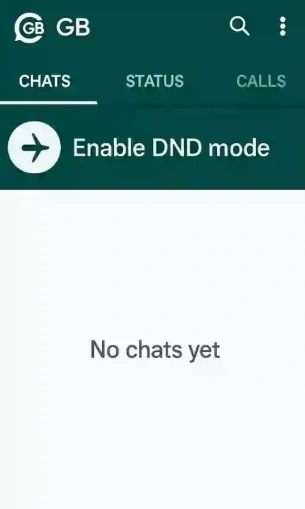
- Tap the Wi-Fi icon on the top bar.
- A pop-up will appear — tap OK to enable DND Mode.
- The icon turns red, confirming that DND Mode is active.
To disable it, tap the same icon again and confirm. GBWhatsApp will reconnect automatically.
Requirements for Using DND Mode
Before you turn on this feature, make sure:
- You’re using the latest version of GBWhatsApp, since older versions might not include DND Mode.
- GBWhatsApp has the necessary permissions to manage network access.
- Background data restrictions for GBWhatsApp are turned off in your phone’s settings, ensuring DND Mode functions properly.
Common Issues and How to Fix Them
Messages not sending after disabling DND
Sometimes messages fail to deliver immediately after turning off DND Mode. To fix this, refresh GBWhatsApp by closing and reopening the app. If messages still don’t send, toggle airplane mode on and off once — this forces the app to reconnect to the network and deliver pending messages.
DND icon missing or not working
If you cannot see the DND icon or tapping it doesn’t activate the feature, it usually means your GBWhatsApp version is outdated. Update to the latest version to ensure all features, including DND Mode, are available and function correctly.
Notifications still appearing during DND Mode
Occasionally, alerts may still appear while DND Mode is active. This is often caused by cached data or temporary glitches. To fix it, go to your phone’s Settings → Apps → GBWhatsApp → Storage, clear the cache, and then restart your phone. After this, DND Mode should work as intended, silencing all notifications.
Maximizing GBWhatsApp DND Mode
To get the most out of DND Mode, consider combining it with other GBWhatsApp features:
- Schedule DND sessions: Use your phone’s built-in digital wellbeing or focus timer to automatically enable DND during work or study hours.
- Pair with mute groups or chats: Even with DND active, you can pre-mute particularly noisy groups to reduce notifications further.
- Use with custom privacy settings: Hide your “last seen” and status updates while DND is on for maximum privacy.
- Combine with auto-reply: If you’re expecting important contacts, set up auto-reply messages so they know you’re temporarily unavailable.
By combining DND Mode with these practices, you can maximize focus, reduce distractions, and maintain privacy without missing anything important.
Regain Your Focus with DND Mode
GBWhatsApp’s DND Mode isn’t just about muting notifications — it’s about reclaiming focus. Whether you’re studying, working, or simply taking a break, this tool helps you stay calm, undisturbed, and productive.Next time your phone won’t stop buzzing, just tap the Wi-Fi icon and enjoy some digital peace.